6. Maths Trigonometry
Trigonometry
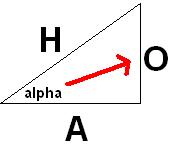
Trigonometry is based on triangles. In this tutorial we are dealing with right-angled triangles, where we can use trigonometry to find an unknown side or angle once we know enough of the other information.
Here is a little diagram to get you started (pretty isnt it).
Opposite, Adjacent And Hypotenuse
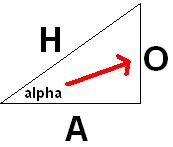
O stands for opposite.
A stands for adjacent.
H stands for hypotenuse.
alpha is the angle in the corner where the angle is either known, or needed to be found.
Ok, now the 3 trigonometric functions are:
Sine, Cosine and Tangent
These will be known as sin, cos and tan on your calculator.
And respectively they each have their own inverse function known as:
sin^-1, cos^-1 and tan^-1
Here I am going to let alpha be @ as I dont have any alpha key to press 😛
So to remind you, alpha is our angle, so @ will be known now as our angle.
SOH CAH TOA
sin@ = O / H
cos@ = A / H
tan@ = O / A
You can easily remember this by a little saying:
SOH CAH TOA
So why do we need this? We need this when we want to find the length of a side in a triangle. If you have the length A and the angle @, then you can use trigonometry to find either H or O. And likewise with the other combinations when you have enough information.
Finding An Unknown Angle
Next we can use trigonometry to find the unknown angle.
To do this, you start with your basic formula, eg:
sin@ = O / H
Now here is one important correction to the old version of this tutorial: sin^-1 does not mean “1 divided by sine” and it is not something we multiply by as the opposite of sine. In this context it means the inverse sine function, usually written asin in programming languages. It answers the question “what angle has this sine value?”
So if:
sin@ = O / H
then:
@ = sin^-1(O / H)
And the same idea applies to cos^-1 and tan^-1.
One more programming gotcha: C/C++ trigonometric functions normally work in radians. Your calculator may be in degrees, so make sure you know which unit you are using or your numbers can look completely bonkers.
How Would We Use This In A Game?
But how would we use this in a game you might say, well take a little look at my next diagram (god I love mspaint).
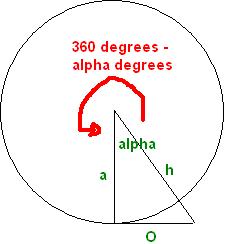
In the image above it shows you a rough idea of how you would make this into a camera for a game. You have yourself in the centre and have 360 degrees of rotation around. Using sine and cosine with your current angle lets you calculate direction components and positions around that circle.
But that is just a quick reference I whipped up in 10 minutes. In the Radian tutorial you will find out just how the camera class relates to trigonometry in more detail.
Questions or corrections? If something doesn’t work or you spot something I’ve got wrong, leave a comment below. These tutorials have been around a long time, so useful corrections are always welcome!