4. GLSL Lighting
GLSL Lighting
Lighting is an essential part of creating realistic 3D scenes. With GLSL shaders, you can achieve more precise control over lighting, including custom effects. This tutorial introduces per-vertex lighting using GLSL, which follows the same basic lighting idea as the fixed-function pipeline but lets us see and control the calculation ourselves.
In per-vertex lighting, the lighting calculations are done at each vertex and interpolated across the surface of the geometry. This tutorial sets up a directional light source and calculates the diffuse lighting intensity at each vertex. One important thing to keep straight is coordinate space: the compatibility variables we use here are in eye/view space, so the normal and the light direction need to be in that same space before we take their dot product.
Main Program
Here is the main program (main.cpp) that sets up the OpenGL context, initialises the shaders, and renders a rotating sphere with per-vertex lighting.
#include <cstdlib>

#if defined(__MACH__) && defined(__APPLE__)
#include <OpenGL/gl.h>
#include <GLUT/glut.h>
#include <OpenGL/glext.h>
#else
#include <GL/glew.h>
#include <GL/gl.h>
#include <GL/glut.h>
#include <GL/glext.h>
#endif

#include "shader.h"

// Shader instance
Shader shader;

// Rotation angle
GLfloat angle = 0.0;

// Diffuse light colour variables
GLfloat dlr = 1.0, dlg = 1.0, dlb = 1.0;

// Ambient light colour variables
GLfloat alr = 0.0, alg = 0.0, alb = 0.0;

// Light position variables
GLfloat lx = 0.0, ly = 1.0, lz = 1.0, lw = 0.0;

void init(void) {
    glEnable(GL_DEPTH_TEST);
    glDepthFunc(GL_LESS);
    shader.init("shader.vert", "shader.frag");
}

void sphere(void) {
    glRotatef(angle, 1.0, 0.0, 0.0);
    glRotatef(angle, 0.0, 1.0, 0.0);
    glRotatef(angle, 0.0, 0.0, 1.0);
    glutSolidSphere(2, 10, 10);
}

void setLighting(void) {
    GLfloat DiffuseLight[] = {dlr, dlg, dlb, 1.0f};
    GLfloat AmbientLight[] = {alr, alg, alb, 1.0f};
    GLfloat LightPosition[] = {lx, ly, lz, lw};

    glLightfv(GL_LIGHT0, GL_DIFFUSE, DiffuseLight);
    glLightfv(GL_LIGHT0, GL_AMBIENT, AmbientLight);
    glLightfv(GL_LIGHT0, GL_POSITION, LightPosition);
}

void display(void) {
    glClearColor(0.0, 0.0, 0.0, 1.0);
    glClear(GL_COLOR_BUFFER_BIT | GL_DEPTH_BUFFER_BIT);
    glLoadIdentity();
    gluLookAt(0.0, 0.0, 5.0, 0.0, 0.0, 0.0, 0.0, 1.0, 0.0);

    setLighting();

    shader.bind();
    sphere();
    shader.unbind();

    glutSwapBuffers();
    angle += 0.01f;
}

void reshape(int w, int h) {
    if (h == 0) h = 1;
    glViewport(0, 0, w, h);
    glMatrixMode(GL_PROJECTION);
    glLoadIdentity();
    gluPerspective(60, (GLfloat)w / (GLfloat)h, 1.0, 100.0);
    glMatrixMode(GL_MODELVIEW);
}

int main(int argc, char **argv) {
    glutInit(&argc, argv);
    glutInitDisplayMode(GLUT_DOUBLE | GLUT_RGBA | GLUT_DEPTH);
    glutInitWindowSize(500, 500);
    glutCreateWindow("GLSL Lighting Example");

    glewInit();
    init();

    glutDisplayFunc(display);
    glutIdleFunc(display);
    glutReshapeFunc(reshape);

    glutMainLoop();
    return 0;
}
Vertex Shader
The vertex shader calculates the lighting intensity at each vertex based on the diffuse lighting model. This intensity is passed to the fragment shader using a varying variable.
varying float diffuse_value;

void main() {
    // gl_NormalMatrix transforms the normal into eye/view space
    vec3 vertex_normal = normalize(gl_NormalMatrix * gl_Normal);

    // Because w = 0, this is a directional light. Its XYZ value is
    // an eye-space light direction, so normalise it before the dot product.
    vec3 vertex_light_direction = normalize(gl_LightSource[0].position.xyz);

    // Calculate diffuse lighting using vectors in the same coordinate space
    diffuse_value = max(dot(vertex_normal, vertex_light_direction), 0.0);

    // Pass the vertex colour to the fragment shader
    gl_FrontColor = gl_Color;

    // Transform the vertex position
    gl_Position = gl_ModelViewProjectionMatrix * gl_Vertex;
}
Fragment Shader
The fragment shader uses the interpolated diffuse_value to calculate the final pixel colour, creating the appearance of lighting across the surface.
varying float diffuse_value;

void main() {
    // Add the ambient term, then the diffuse contribution
    vec4 ambient = gl_Color * gl_LightSource[0].ambient;
    vec4 diffuse = gl_Color * gl_LightSource[0].diffuse * diffuse_value;
    gl_FragColor = ambient + diffuse;
}
Understanding the Code
- Vertex Shader:
- The dot product between the vertex normal and light direction calculates the intensity of light on the surface.
gl_NormalMatrixgives us an eye-space normal, while this directional light is also represented in eye space.normalizemakes both vectors unit length, which is critical for the dot product to behave as a lighting cosine.
- Fragment Shader:
- The interpolated
diffuse_valuecreates smooth transitions between the values calculated at each vertex. This is why this technique is called per-vertex lighting, even though the fragment shader still receives the interpolated result.
- The interpolated
- Lighting Setup:
setLightinginitialises the diffuse and ambient light colours and sets a directional light usingw = 0. The light position/direction is transformed by the current model-view matrix whenglLightfv(..., GL_POSITION, ...)is called.
Output Behaviour
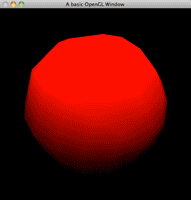
When you run this program, you should see a sphere with a gradient lighting effect, brighter where the light hits directly and darker where it falls off. The lighting changes dynamically as the sphere rotates.
Source & downloads
Questions or corrections? If something doesn’t work or you spot something I’ve got wrong, leave a comment below. These tutorials have been around a long time, so useful corrections are always welcome!


Thank you very much for your nice tutorials, but why are most of them formatted with a centered text-alignment? This makes them really unreadable, especially the code sections!
Best regards!
Hey, great tutorials on your site 🙂
Just one suggestion, it would be great if you provided screenshots of what the final output will look like in some of these tutorials.
Keep up the good work
Oh i just noticed you mention images in the tutorial but they’re not showing 🙂
Hey Damo,
In a lot of the older tutorials (GLSL included) I originally had an image per tutorial but they have gone walkabout over the years through several site transitions.
If I ever get the chance to come back and put a lot of effort into the site, I would love to put updated images back.
Thanks,
Swiftless
Hi,
The dot product shouldn’t be between the vertex normal and the vector from vertex coords and light pos?
Isn’t the light pos in the dot product doing the light relative to the origin position 0,0,0 ?
This didn’t work for me. I ended up having to mix some of your code with most of http://nehe.gamedev.net/data/articles/article.asp?article=21
Hey,
Could you give an example of what you had to change? I haven’t had any other reported problems?
Cheers,
Swiftless