7. Texturing in GLSL
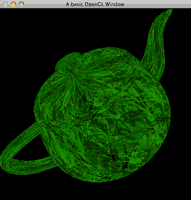
GLSL Texturing
Textures bring life and detail to your 3D objects, allowing you to map 2D images onto surfaces. In this tutorial, we’ll explore how to integrate textures into GLSL shaders, covering key concepts like the use of sampler2D and texture coordinates.
Introduction to sampler2D
In GLSL, textures are accessed using sampler uniforms. A sampler2D does not contain the image itself; its integer value selects the texture image unit that the shader will sample. A value of 0 means texture unit GL_TEXTURE0, 1 means GL_TEXTURE1, and so on. The texture object itself is bound to that unit by the OpenGL application.
It’s worth noting that GLSL also supports sampler1D, sampler3D, and specialised samplers for shadow maps and cube maps, but in this tutorial, we’ll focus on sampler2D to keep things simple.
Main Program
Our main program will:
- Load a texture.
- Bind that texture object to texture unit 0.
- Tell the shader sampler to read from texture unit 0.
- Pass texture coordinates through the vertex shader to the fragment shader.
Here’s the complete implementation:
#include <cstdlib>

#if defined(__MACH__) && defined(__APPLE__)
#include <OpenGL/gl.h>
#include <GLUT/glut.h>
#include <OpenGL/glext.h>
#else
#include <GL/glew.h>
#include <GL/gl.h>
#include <GL/glut.h>
#include <GL/glext.h>
#endif

#include "shader.h"

Shader shader;    // Shader program
GLuint texture;   // Texture ID

GLfloat angle = 0.0;  // Rotation angle for teapot

GLuint LoadTexture(const char *filename, int width, int height) {
    GLuint texture;
    unsigned char *data;
    FILE *file;

    // Load RAW image data
    file = fopen(filename, "rb");
    if (file == NULL) return 0;
    data = (unsigned char *)malloc(width * height * 3);
    fread(data, width * height * 3, 1, file);
    fclose(file);

    // Generate and bind texture
    glGenTextures(1, &texture);
    glBindTexture(GL_TEXTURE_2D, texture);
    // Set texture parameters
    glTexParameterf(GL_TEXTURE_2D, GL_TEXTURE_MIN_FILTER, GL_LINEAR);
    glTexParameterf(GL_TEXTURE_2D, GL_TEXTURE_MAG_FILTER, GL_LINEAR);
    glTexParameterf(GL_TEXTURE_2D, GL_TEXTURE_WRAP_S, GL_REPEAT);
    glTexParameterf(GL_TEXTURE_2D, GL_TEXTURE_WRAP_T, GL_REPEAT);

    // Generate texture
    glTexImage2D(GL_TEXTURE_2D, 0, GL_RGB, width, height, 0, GL_RGB, GL_UNSIGNED_BYTE, data);
    free(data);

    return texture;
}

void init(void) {
    glEnable(GL_DEPTH_TEST);  // Enable depth testing
    glEnable(GL_LIGHTING);    // Enable lighting
    glEnable(GL_LIGHT0);      // Enable light source 0

    shader.init("shader.vert", "shader.frag"); // Initialise shaders
    texture = LoadTexture("texture.raw", 256, 256); // Load texture
}

void cube(void) {
    glRotatef(angle, 1.0, 0.0, 0.0); // Rotate on the X-axis
    glRotatef(angle, 0.0, 1.0, 0.0); // Rotate on the Y-axis
    glRotatef(angle, 0.0, 0.0, 1.0); // Rotate on the Z-axis

    // Bind our texture object to texture unit 0
    glActiveTexture(GL_TEXTURE0);
    glBindTexture(GL_TEXTURE_2D, texture);

    // The shader is already bound when cube() is called from display().
    // Tell the sampler uniform to read from texture unit 0.
    int texture_location = glGetUniformLocation(shader.id(), "color_texture");
    glUniform1i(texture_location, 0);

    glutSolidTeapot(2.0); // Render teapot
}

void display(void) {
    glClear(GL_COLOR_BUFFER_BIT | GL_DEPTH_BUFFER_BIT); // Clear buffers
    glLoadIdentity();
    gluLookAt(0.0, 0.0, 5.0, 0.0, 0.0, 0.0, 0.0, 1.0, 0.0); // Set camera

    shader.bind();
    cube();
    shader.unbind();

    glutSwapBuffers();
    angle += 0.01f; // Increment rotation angle
}

void reshape(int w, int h) {
    if (h == 0) h = 1;
    glViewport(0, 0, (GLsizei)w, (GLsizei)h);
    glMatrixMode(GL_PROJECTION);
    glLoadIdentity();
    gluPerspective(60, (GLfloat)w / (GLfloat)h, 1.0, 100.0);
    glMatrixMode(GL_MODELVIEW);
}

int main(int argc, char **argv) {
    glutInit(&argc, argv);
    glutInitDisplayMode(GLUT_DOUBLE | GLUT_RGBA | GLUT_DEPTH); // Enable double buffering and depth
    glutInitWindowSize(500, 500);
    glutCreateWindow("GLSL Texturing");

    glewInit();  // Initialise GLEW
    init();

    glutDisplayFunc(display);
    glutIdleFunc(display);
    glutReshapeFunc(reshape);

    glutMainLoop();
    return 0;
}
Vertex Shader
The vertex shader’s role is to pass texture coordinates from OpenGL to the fragment shader. To do this, it writes the texture coordinates into gl_TexCoord[0].
How It Works:
- Reading Texture Coordinates:
The variable gl_MultiTexCoord0 holds the texture coordinates supplied by OpenGL for the first texture unit (active texture 0). - Writing to
gl_TexCoord:
The vertex shader writes the texture coordinates to gl_TexCoord[0], making them available to the fragment shader. - Result:
By passing the coordinates from gl_MultiTexCoord0 to gl_TexCoord[0], we allow GLSL to handle multitexturing setups seamlessly.
Here’s the full vertex shader:
void main() {
    // Pass texture coordinates to the fragment shader
    gl_TexCoord[0] = gl_MultiTexCoord0;

    // Transform vertex position to clip space
    gl_Position = gl_ModelViewProjectionMatrix * gl_Vertex;
}
Fragment Shader
The fragment shader uses the sampler2D uniform variable to sample the texture colour and applies it to the object.
Key Points:
- Defining the Texture Variable:
The lineuniform sampler2D color_texture;declares a sampler. The value we assign withglUniform1itells it which texture unit to sample; it is not the texture object ID itself. - Sampling the Texture:
The functiontexture2D(color_texture, gl_TexCoord[0].st)fetches the colour of the texture at the given texture coordinates. - Returning the Final Colour:
The sampled texture colour, a vec4 containing RGBA values, is assigned to gl_FragColor for rendering.
Here’s the complete fragment shader:
uniform sampler2D color_texture; // 2D texture uniform

void main() {
    // Sample texture and assign it as the fragment colour
    gl_FragColor = texture2D(color_texture, gl_TexCoord[0].st);
}
The old fixed-function call glTexEnvf(GL_TEXTURE_ENV, ...) is deliberately gone here. When a shader samples the texture, the fragment shader decides what to do with that sampled colour; the old fixed-function texture-environment mode is not what controls this result.
Source & downloads
Questions or corrections? If something doesn’t work or you spot something I’ve got wrong, leave a comment below. These tutorials have been around a long time, so useful corrections are always welcome!

Why use centering for the code parts on this page? It is rather difficult to read!
Hey someone,
Apologies, I get a lot of comments about these older tutorials not being formatted correctly but I don’t have the time to update them.
One day I will try to get it fixed!
Thanks,
Swiftless
Dear Swifless,
Thanks for your help in shader but the problem is the last texturing file didnt work in my pc.I didnt get any error while I run this code but I didnt get any output of teturing.The output seems to be blank.I think I didnt idea of how to put the code of shader.vert and shader.frag in texturing file.Please do help me since I m new to shader.
With Regards,
pb
Dear swiftless,
when i run the code of texture.I didn`t get any output though there isn`t any error in the code.The output seems to be blank. I put the code of shader.vert and shader.frag as it is.(downloaded from texturing ).So, should there be any change in the code or should I have to add this code in previous lighting file??Please suggest me.
Regards,
PB
does it also work with other solid(other than teapot)? I tried but no result like teapot….??
It is due to size of loaded texture??
Hi Bikash.
It only works with the glutSolidTeapot because it is the only glutSolid shape which has texture coordinates assigned to it.
Thanks,
Swiftless
it works fine to me but when i change glutSolidTeapot(2.0); to glutSolidCube(2.0) or other solid glut image;
whole the cube seems green only(not as teapot or no texture).
Is this only work for glutSolidTeapot??
bugfix in shader.cpp:
initialize pointer:
static char* textFileRead(const char *fileName) {
char* text = NULL;
There’s no link to a texture file in the download list for this tutorial. I found one here though: http://www.swiftless.com/tutorials/opengl/cplusplus/texture.zip
Hey Swift!
I was wondering how you make the “raw” files? Like the texture.raw. I can’t find any program to convert any file into raw. It may sound like a stupid question but please I am new to this and I need your help : )
not sure if you notice this but your theme is cutting the text, take a look here:
http://i.imgur.com/fDh8z.png
look at: didn’t rename the method, naughty me
well “rename the method” gets cut/hidden so its not really possible to follow the text, please correct this. If you need help with that, I am wordpress theme developer and can help you probably with css/html, in that case drop me an email and I’ll be glad to help 🙂
Hi Swiftless,
I have a following question,
file = fopen( filename, “rb” );
if ( file == NULL ) return 0;
data = (unsigned char *)malloc( width * height * 3 );
fread( data, width * height * 3, 1, file );
fclose( file );
glGenTextures( 1, &texture ); //generate the texture with the loaded
data
glBindTexture( GL_TEXTURE_2D, texture ); //bind the texture to it’s
array
glTexEnvf( GL_TEXTURE_ENV, GL_TEXTURE_ENV_MODE,
GL_MODULATE ); /
when you use the function, glGenTextures(),
How does the openGL understand to read the texture from the pointer “data”? I mean where have you passed ‘data ‘ to openGL.
Thank you for your effort! Keep up with your great tutorials!
…and takes the paramters for the shader id, and the name of the variable inside the shader for our texture.
int texture_location = glGetUniformLocation(shader.id(), “texture_color”);
and
uniform sampler2D color_texture;
dont seem to line up, is this intentional?
Hey Fonix,
That’s a typo, just rename either of the variables to match up with the other.
Cheers,
Swiftless
Hey Bloodust,
I’m surprised you got all the way to tutorial 7 before that 😛
I’ve mentioned that in the comments for the previous tutorials. The reason I don’t have it, is because I made these tutorials on OSX and on OSX that call isn’t needed.
Cheers,
Swiftless
Great but missing glew initialization and without it my shader couldnt be created because
“Unhandled exception at 0x00000000”
add this to main before init()
if(glewInit() != GLEW_OK)
return 0;
or just
glewInit();
@Swiftless:
actually my game using shader from yours tuts looks like this:
http://www.gamedev.pl/projects.php?x=view&id=1198
Great tutorial!
I forgot the line
gl_TexCoord[0] = gl_MultiTexCoord0;
in my vertex shader until i saw your tutorial, then it was suddenly working.
it can feel so great to see a simple 2d texture quad on the screen sometimes when you’re doing graphics programming.