5. GLSL Per Pixel Lighting
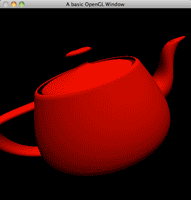
GLSL Per-Pixel Lighting
Per-pixel lighting is the common name for a technique where the lighting calculation is moved from the vertex shader into the fragment shader. Technically the shader runs per generated fragment, not literally once for every physical screen pixel, but “per-pixel lighting” is the name you will see everywhere. This approach produces smoother and more realistic lighting, especially on curved surfaces or high-polygon models. In this tutorial, we’ll demonstrate how to set up per-pixel lighting using GLSL.
We’ll create shaders that calculate lighting in the fragment shader and render a rotating teapot to visualise the effect.
Main Program
The main program initialises the OpenGL context, loads the shaders, and renders a teapot with per-pixel lighting. Below is the implementation:
#include <cstdlib>

#if defined(__MACH__) && defined(__APPLE__)
#include <OpenGL/gl.h>
#include <GLUT/glut.h>
#include <OpenGL/glext.h>
#else
#include <GL/glew.h>
#include <GL/gl.h>
#include <GL/glut.h>
#include <GL/glext.h>
#endif

#include "shader.h"

// Shader instance
Shader shader;

// Rotation angle
GLfloat angle = 0.0;

// Diffuse light colour variables
GLfloat dlr = 1.0, dlg = 1.0, dlb = 1.0;

// Ambient light colour variables
GLfloat alr = 0.0, alg = 0.0, alb = 0.0;

// Light position variables
GLfloat lx = 0.0, ly = 1.0, lz = 1.0, lw = 0.0;

void init(void) {
    glEnable(GL_DEPTH_TEST);
    glDepthFunc(GL_LESS);
    shader.init("shader.vert", "shader.frag");
}

void teapot(void) {
    glRotatef(angle, 1.0, 0.0, 0.0);  // Rotate on X-axis
    glRotatef(angle, 0.0, 1.0, 0.0);  // Rotate on Y-axis
    glRotatef(angle, 0.0, 0.0, 1.0);  // Rotate on Z-axis
    glColor4f(1.0, 0.0, 0.0, 1.0);   // Set teapot colour to red
    glutSolidTeapot(2);
}

void setLighting(void) {
    GLfloat DiffuseLight[] = {dlr, dlg, dlb, 1.0f};
    GLfloat AmbientLight[] = {alr, alg, alb, 1.0f};
    GLfloat LightPosition[] = {lx, ly, lz, lw};

    glLightfv(GL_LIGHT0, GL_DIFFUSE, DiffuseLight);
    glLightfv(GL_LIGHT0, GL_AMBIENT, AmbientLight);
    glLightfv(GL_LIGHT0, GL_POSITION, LightPosition);
}

void display(void) {
    glClearColor(0.0, 0.0, 0.0, 1.0);
    glClear(GL_COLOR_BUFFER_BIT | GL_DEPTH_BUFFER_BIT);
    glLoadIdentity();
    gluLookAt(0.0, 0.0, 5.0, 0.0, 0.0, 0.0, 0.0, 1.0, 0.0);

    setLighting();

    shader.bind();
    teapot();
    shader.unbind();

    glutSwapBuffers();
    angle += 0.1f;
}

void reshape(int w, int h) {
    if (h == 0) h = 1;
    glViewport(0, 0, w, h);
    glMatrixMode(GL_PROJECTION);
    glLoadIdentity();
    gluPerspective(60, (GLfloat)w / (GLfloat)h, 1.0, 100.0);
    glMatrixMode(GL_MODELVIEW);
}

int main(int argc, char **argv) {
    glutInit(&argc, argv);
    glutInitDisplayMode(GLUT_DOUBLE | GLUT_RGBA | GLUT_DEPTH);
    glutInitWindowSize(500, 500);
    glutCreateWindow("GLSL Per-Pixel Lighting Example");

    glewInit();
    init();

    glutDisplayFunc(display);
    glutIdleFunc(display);
    glutReshapeFunc(reshape);

    glutMainLoop();
    return 0;
}
Vertex Shader
The vertex shader passes the transformed normal and light direction to the fragment shader for the per-fragment lighting calculation. Just like the previous tutorial, both values need to be in the same coordinate space. In this compatibility example that space is eye/view space.
varying vec3 vertex_light_direction;
varying vec3 vertex_normal;

void main() {
    // Transform the normal into eye/view space
    vertex_normal = gl_NormalMatrix * gl_Normal;

    // w = 0 makes this a directional light. The compatibility light
    // value is in eye/view space, matching the normal above.
    vertex_light_direction = gl_LightSource[0].position.xyz;

    // Pass the vertex colour to the fragment shader
    gl_FrontColor = gl_Color;

    // Transform the vertex position
    gl_Position = gl_ModelViewProjectionMatrix * gl_Vertex;
}
Explanation:
- Normal Transformation:
gl_NormalMatrixconverts the object normal into eye/view space. - Light Direction: Because
w = 0,gl_LightSource[0].position.xyzrepresents a directional light in that same eye/view space. We pass it through and normalise after interpolation. - Colour Passing:
gl_FrontColorensures that vertex colours are passed to the fragment shader.
Fragment Shader
The fragment shader calculates the lighting for each pixel using the interpolated normal and light position.
varying vec3 vertex_light_direction;
varying vec3 vertex_normal;

void main() {
    // Interpolation changes vector lengths, so normalise again here
    vec3 normal = normalize(vertex_normal);
    vec3 light_direction = normalize(vertex_light_direction);

    // Calculate diffuse lighting using the dot product
    float diffuse_value = max(dot(normal, light_direction), 0.0);

    // Add ambient light and the diffuse contribution
    vec4 ambient = gl_Color * gl_LightSource[0].ambient;
    vec4 diffuse = gl_Color * gl_LightSource[0].diffuse * diffuse_value;
    gl_FragColor = ambient + diffuse;
}
Explanation:
- Normalisation: Interpolated vectors are not guaranteed to stay unit length, so we normalise them in the fragment shader before using the dot product.
- Diffuse Lighting: The dot product between the normal and light direction determines the light intensity at the pixel.
- Fragment Colour: The final colour is calculated by multiplying the diffuse intensity by the vertex colour.
The difference from the last tutorial is small in code, but important visually: instead of interpolating one finished lighting value between vertices, we interpolate the vectors and do the actual dot product for each fragment. That gives curved surfaces a much smoother result.
Benefits of Per-Pixel Lighting
- Improved Visual Quality: Lighting is calculated for every pixel, resulting in smoother shading and fewer artefacts.
- Dynamic Effects: Enables detailed and realistic lighting effects for complex models.
Source & downloads
Questions or corrections? If something doesn’t work or you spot something I’ve got wrong, leave a comment below. These tutorials have been around a long time, so useful corrections are always welcome!
It seems like it would work for GLSL shaders mod for Minecraft
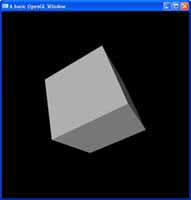
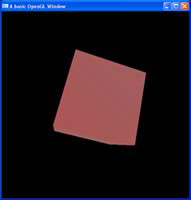
Hi. IMHO this is not per pixel lightning yet. It’s still flat vertex/surface lightning calculated in fragment shader insted in vertex shader. It still calculates light position to vertex normal insted light to fragment position or interpolated positions from vertices of triangles. You can clearly see that if You draw cube insted of teapot or sphere.
I can’t figure out how to add specular light to the pixel shader.
When I do, it comes out per-vertex, not per-pixel…
Wtf?!
Using the light position is like 10x easier than the direction!!!!
Might be this is a real noob question,
I have followed the 5 GLSL tutes uptill now, but I am unable to understand that, how have we achieved per pixel/ vertex effects, I mean we have called our shader program inside the ‘display’ function and this will update per frame. Thus the code in shader program will affect each and every pixel/vertex in same way. How have we achieved control on each vertex/pixel?
How can we in same run, say change color of few pixels to red and few white depending on their z values?
Hi Paras,
If you would like to do something like that, the vertex shader allows you to read the z-values of vertices. You can then set up a variable which is sent from the vertex shader to the fragment shader, and the fragment shader can use this variable to decide on whether or not to change the colour of the current pixels.
It might be important to note that pixel values are interpolated between vertices. So if one vertex has a z-value of -10 and we tell the pixels for that vertex to be red, and the next vertex has a z-value of -20 (both for the same geometry), and we tell the pixels for that vertex to be green, then we will see a smoothing between red and green.
While we have full control over our pixels, we can’t access them straight on an x,y basis and say, I want this pixel at this location, to be this. The pixel shader is applied to geometry, and the pixels created by the geometry are what are manipulated.
Cheers,
Swiftless
Why do you call it “vertex_light_position”, when it is very clearly a light *direction*? You normalize it, you dot it with the surface normal. It’s a direction, not a position.
Also, there’s no reason to pass it as a varying, since it doesn’t change. It’s just the light direction accessed from the OpenGL variables. Which the fragment shader can access just as well as the vertex shader.
Hey Alfonse,
While your comments have a point, I call it vertex_light_position because OpenGL refers to it as light position. Also, it depends on the type of light, if you have a point light, it has a position and no direction while a directional light is opposite and has a direction but no position.
As for varying variables, it is not always optimal to do all your lighting calculations in the fragment shader this lets us offload some parts to the vertex shader. This also saves us reading the variable every pixel from OpenGL, we can read it per vertex which can save quite a few fetches.
Thanks,
Swiftless
Yes, OpenGL’s default lighting variables do call it a “position” even for directional lights. But that doesn’t mean that you need to do so. This is, after all, a tutorial; a way to make things clearer to the user. Treating a position like a direction does not help make things clearer.
As for the cost of reading uniforms in a fragment shader, that simply doesn’t exist. Reading uniforms costs just as much as reading varyings.
Also, passing varyings has a very real cost associated with it. It makes the per-output vertex data bigger, which means that per-output vertex data takes up more room in the post-T&L cache. Which means you can have fewer vertices in the post T&L cache. Which slows things down.
The cost of reading a uniform doesn’t compare to the cost of an additional varying.
Hi Alfonse,
I see what you mean, but I stick by my position it call it position to keep the transition simple from the fixed function mode. But I should explain this better when I do a rewrite of the tutorial eventually. I’m pretty sure I explain it on the OpenGL Tips page, but that is a bit of a round-about trip. Also, it’s not the fact that it’s dotted and normalized that makes it a direction. You do the same calculations for a position light (It shoots out in all directions). It’s just a minor change in the rest of your code to switch from positional to directional in appearance.
I’m not sure you understand what I meant in regard to the number of variable fetches.
“As for varying variables, it is not always optimal to do all your lighting calculations in the fragment shader this lets us offload some parts to the vertex shader.”
For example, you do the dot product calculation. If you do it per-vertex, you may have 1000 vertices and this means 1000 dot product calculations, as opposed to possibly 1000×1000 calculations if you do it on a per-pixel basis. Yes, there is a difference in quality, this is per-vertex lighting compared to per-pixel lighting, but it’s a valid example of the speed difference.
“This also saves us reading the variable every pixel from OpenGL, we can read it per vertex which can save quite a few fetches. ”
Take bump mapping vs displacement mapping. Either way you have a texture read. But in the vertex shader, you only have one texture fetch per vertex, as opposed to a texture fetch every pixel.
These examples are more on the extreme differences side, but it shows the point I am trying to make clearly.
Just a note on what you mentioned. Uniforms vs Varyings in regard to speed. Uniforms are passed from system memory to GPU memory, this has a MUCH higher cost associated with it compared to a varying variable which is created on the GPU and requires no passing around in memory.
I’d like to know where the information is coming from that the more varying variables you have, the less vertices you can have. Vertex output relies on the hardware capability, not the amount of varying variables you have. Imagine the kind of trouble geometry shaders and tesselation engines would run into if that was the case, where you can effectively output several times the number of incoming vertices.
Cheers,
Swiftless