2. Terrain Loading
Jump To:
heightfield.h Source
heightfield.cpp Source
Heightfield.H File:
Our first changes will take place in our heightfield.h file. First we need to include the windows.h header file because we are using the BYTE variable type specified within the windows.h file for loading in from our heightfield.raw image file.
#include <windows.h>
We then need to declare a variable with the BYTE variable which I am calling hHeightField like so:
BYTE hHeightField[1024][1024];
#include <windows.h>

class SwiftHeightField {
public:
    bool Create(char *hFileName, const int hWidth, const int
    hHeight);

    void Render(void);

    BYTE hHeightField[1024][1024];
};
Heightfield.CPP File:
First off here, just as above we are including another header file, only this one is stdio.h and it is used to output our loaded in data to the console window to show that we have actually loaded in some data.
#include <stdio.h>
Then we are going to play with our Create function. First off we need to declare a FILE variable, which I am just calling fp as so:
FILE *fp;
We then need to actually open our heightfield.raw file into our fp variable. Because file loading can fail (wrong path, missing file, permissions, and so on), we should check the result straight away instead of assuming the file opened correctly:
FILE *fp = fopen(hFileName, "rb");
if (fp == NULL) {
    return false;
}
I am using the expression "rb", which stands for read as binary, so we are reading data in rather than writing it out. We expect one byte for each point in the heightfield. For a 1024 x 1024 heightfield that is 1,048,576 bytes – yep, that’s gonna be a lot of vertices ^_^.
const size_t expectedBytes =
    static_cast<size_t>(hWidth) * static_cast<size_t>(hHeight);

const size_t bytesRead =
    fread(hHeightField, 1, expectedBytes, fp);

fclose(fp);

if (bytesRead != expectedBytes) {
    return false;
}
Checking the number of bytes read means a truncated or incorrect RAW file fails cleanly instead of leaving us to render partly uninitialised height data.
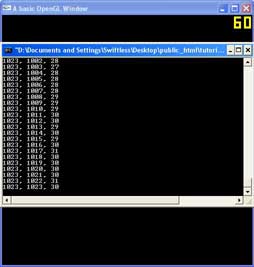
The next 5 lines make up a look which will go through each piece of data we read in to our hHeightField variable and print it to the console window.
for (int hMapX = 0; hMapX < hWidth; hMapX++){
    for (int hMapZ = 0; hMapZ < hHeight; hMapZ++){
        printf("%d, %d, %d\n", hMapX, hMapZ, hHeightField[hMapX][hMapZ]);
    }
}
#include "heightfield.h"

bool SwiftHeightField::Create(char *hFileName, const
int hWidth, const int hHeight){
    if (hWidth <= 0 || hHeight <= 0 || hWidth > 1024 || hHeight > 1024) {
        return false;
    }

    FILE *fp = fopen(hFileName, "rb");
    if (fp == NULL) {
        return false;
    }

    const size_t expectedBytes = static_cast<size_t>(hWidth) * static_cast<size_t>(hHeight);
    const size_t bytesRead = fread(hHeightField, 1, expectedBytes, fp);
    fclose(fp);

    if (bytesRead != expectedBytes) {
        return false;
    }

    for (int hMapX = 0; hMapX < hWidth; hMapX++){
        for (int hMapZ = 0; hMapZ < hHeight; hMapZ++){
            printf("%d, %d, %d\n", hMapX, hMapZ, hHeightField[hMapX][hMapZ]);
        }
    }

    return true;
}

void SwiftHeightField::Render(void){

}
Main.CPP File:
Hehe, this is a simple change. All we need to do here is change our Create call to load in the file, heightfield.raw. So our Create line looks like:
hField.Create("heightfield.raw", 1024, 1024);
Check out the next tutorial on rendering the heightfield here 🙂
#include <GL/glew.h>
#include <GL/gl.h>
#include <GL/glext.h>
#include <GL/GLUT.h>

#include <math.h>

#include <windows.h>
#include <stdio.h>
#include <string.h>
#include <fstream>
#include <assert.h>

#include "heightfield.h"

#pragma comment(lib,"glew32.lib")

float xpos = 851.078, ypos = 351.594, zpos = 281.033, xrot = 758, yrot = 238,
angle=0.0;
float lastx, lasty;

float bounce;
float cScale = 1.0;

SwiftHeightField hField;

void camera(void) {
    int posX = (int)xpos;
    int posZ = (int)zpos;

    glRotatef(xrot,1.0,0.0,0.0);
    glRotatef(yrot,0.0,1.0,0.0);
    glTranslated(-xpos,-ypos,-zpos);
}

void display(void) {
    glClearColor(0.0,0.0,0.0,1.0);
    glClear(GL_COLOR_BUFFER_BIT | GL_DEPTH_BUFFER_BIT);
    glLoadIdentity();
    camera();

    hField.Render();

    glutSwapBuffers();
}

void Init(void) {
    glEnable(GL_DEPTH_TEST);

    hField.Create("heightfield.raw", 1024, 1024);
}

void mouseMovement(int x, int y) {
    int diffx=x-lastx;
    int diffy=y-lasty;
    lastx=x;
    lasty=y;
    xrot += (float) diffy;
    yrot += (float) diffx;
}

void keyboard(unsigned char key, int x, int y) {

    if (key == 'w')
        {
        float xrotrad, yrotrad;
        yrotrad = (yrot / 180 * 3.141592654f);
        xrotrad = (xrot / 180 * 3.141592654f);
        xpos += float(sin(yrotrad)) * cScale;
        zpos -= float(cos(yrotrad)) * cScale;
        ypos -= float(sin(xrotrad)) ;
        bounce += 0.04;
    }

    if (key == 's')
        {
        float xrotrad, yrotrad;
        yrotrad = (yrot / 180 * 3.141592654f);
        xrotrad = (xrot / 180 * 3.141592654f);
        xpos -= float(sin(yrotrad)) * cScale;
        zpos += float(cos(yrotrad)) * cScale;
        ypos += float(sin(xrotrad));
        bounce += 0.04;
    }

    if (key == 'd')
        {
        float yrotrad;
        yrotrad = (yrot / 180 * 3.141592654f);
        xpos += float(cos(yrotrad)) * cScale;
        zpos += float(sin(yrotrad)) * cScale;
    }

    if (key == 'a')
        {
        float yrotrad;
        yrotrad = (yrot / 180 * 3.141592654f);
        xpos -= float(cos(yrotrad)) * cScale;
        zpos -= float(sin(yrotrad)) * cScale;
    }

}

void reshape(int w, int h) {
    if (h == 0) h = 1;
    glViewport(0, 0, (GLsizei)w, (GLsizei)h);
    glMatrixMode(GL_PROJECTION);
    glLoadIdentity();
    gluPerspective(60, (GLfloat)w / (GLfloat)h, 1.0, 1000.0);
    glMatrixMode(GL_MODELVIEW);
}

int main(int argc, char **argv) {
    glutInit(&argc, argv);
    glutInitDisplayMode(GLUT_DOUBLE | GLUT_DEPTH | GLUT_RGBA);
    glutInitWindowSize(500, 500);
    glutInitWindowPosition(100, 100);
    glutCreateWindow("A basic OpenGL Window");
    Init();
    glutDisplayFunc(display);
    glutIdleFunc(display);
    glutReshapeFunc(reshape);
    glutKeyboardFunc(keyboard);
    glutPassiveMotionFunc(mouseMovement);
    glutMainLoop();
    return 0;
}
Source & downloads
Questions or corrections? If something doesn’t work or you spot something I’ve got wrong, leave a comment below. These tutorials have been around a long time, so useful corrections are always welcome!


looks good, but the download files not found 🙁