30. OpenGL Circle Drawing (Version 2.0)
Introduction
In OpenGL, there is no predefined function to draw a perfect circle. However, we can create one by approximating it with a series of connected line segments. This tutorial will walk you through creating a custom function to generate circles using basic trigonometric functions and OpenGL commands.
We’ll also explore how to adjust the circle’s position, size, and smoothness by modifying its parameters.
Defining a Circle
To represent a circle in our program, we’ll use a simple struct to hold the x and y coordinates of each point on the circle:
typedef struct {
    float x; // X-coordinate of the point
    float y; // Y-coordinate of the point
} CIRCLE;

CIRCLE circle; // Declare a variable of type CIRCLE
Creating the Circle
The core of this tutorial lies in the createcircle function. This function generates a circle by calculating the coordinates of points along its circumference using trigonometric functions.
The function takes three parameters:
- k: Translation along the y-axis.
- r: Radius of the circle.
- h: Translation along the x-axis.
Here’s the implementation:
void createcircle(int k, int r, int h) {
    const int segments = 180;
    const float pi = 3.14159265358979323846f;

    glBegin(GL_LINE_LOOP);
    for (int i = 0; i < segments; ++i) {
        const float angle = 2.0f * pi * static_cast<float>(i) / static_cast<float>(segments);

        circle.x = h + r * std::cos(angle);
        circle.y = k + r * std::sin(angle);

        glVertex3f(circle.x, circle.y, 0.0f);
    }
    glEnd();
}
Understanding the Math
To compute the points along the circle, we use trigonometry:
- The x-coordinate of a point is calculated as:

- The y-coordinate of a point is calculated as:

Here:
- r is the radius of the circle.
- θ is the angle in radians.
- h and k are translations along the x-axis and y-axis, respectively.
Drawing Circles with Different Properties
To draw a circle, simply call the createcircle function and pass the desired parameters. For example:
createcircle(0, 10, 0); // Circle centered at (0, 0) with radius 10
You can modify the parameters to change the circle’s position and size:
- Increase r for a larger circle.
- Adjust h and k to translate the circle horizontally and vertically.
Adding Multiple Circles
You can use the createcircle function to draw multiple circles with different properties. For instance:
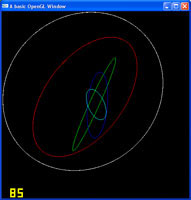
glColor3f(1, 0, 0); // Set colour to red
createcircle(0, 10, 0);

glColor3f(0, 1, 0); // Set colour to green
createcircle(-2, 8, -2);

glColor3f(0, 0, 1); // Set colour to blue
createcircle(2, 4, 2);
Full Program
Here’s the complete implementation, including rendering multiple circles and animating them:
#include <GL/gl.h>
#include <GL/glut.h>
#include <cmath>

typedef struct {
    float x;
    float y;
} CIRCLE;

CIRCLE circle;
float rot = 0;

void createcircle(int k, int r, int h) {
    const int segments = 180;
    const float pi = 3.14159265358979323846f;

    glBegin(GL_LINE_LOOP);
    for (int i = 0; i < segments; ++i) {
        const float angle = 2.0f * pi * static_cast<float>(i) / static_cast<float>(segments);

        circle.x = h + r * std::cos(angle);
        circle.y = k + r * std::sin(angle);

        glVertex3f(circle.x, circle.y, 0.0f);
    }
    glEnd();
}

void display(void) {
    glClearColor(0.0, 0.0, 0.0, 1.0);
    glClear(GL_COLOR_BUFFER_BIT);
    glLoadIdentity();
    glTranslatef(0, 0, -20);

    glRotatef(rot, 0, 1, 0);
    glColor3f(1, 1, 1);
    createcircle(0, 10, 0);

    glColor3f(1, 0, 0);
    createcircle(-2, 8, -2);

    glColor3f(0, 1, 0);
    createcircle(-1, 6, -1);

    glColor3f(0, 0, 1);
    createcircle(2, 4, 2);

    glColor3f(0, 1, 1);
    createcircle(1, 2, 1);

    glutSwapBuffers();
    rot++;
}

void reshape(int w, int h) {
    if (h == 0) h = 1;
    glViewport(0, 0, (GLsizei)w, (GLsizei)h);
    glMatrixMode(GL_PROJECTION);
    glLoadIdentity();
    gluPerspective(60, (GLfloat)w / (GLfloat)h, 0.1, 100.0);
    glMatrixMode(GL_MODELVIEW);
}

int main(int argc, char **argv) {
    glutInit(&argc, argv);
    glutInitDisplayMode(GLUT_DOUBLE);
    glutInitWindowSize(500, 500);
    glutInitWindowPosition(100, 100);
    glutCreateWindow("OpenGL Circle Drawing");
    glutDisplayFunc(display);
    glutIdleFunc(display);
    glutReshapeFunc(reshape);
    glutMainLoop();
    return 0;
}
Source & downloads
Questions or corrections? If something doesn’t work or you spot something I’ve got wrong, leave a comment below. These tutorials have been around a long time, so useful corrections are always welcome!

i need to know how to draw scaling line inside the circle how to do that?
Bob,
How did you arrive at the constant 6.28f in the below lines
onst int kSegments = 30;
const GLfloat kRadianIncr = 6.28f/kSegments;
6.28f is simply 2 * PI. PI is 3.14159…. which you will see in geometry books. It is the constant that maps a circle radius to its circumference.
very nice presentation.
i try this code
”
#include
#include
#include
GLfloat d;
float p1x=0.0;
float p1y=0.0;
float p1z=0.0;
const float p1radius = 8.0;
const float p2radius = 8.0;
float yRotationAngle = 0.0f;
int k=0,l=0;
float p2x=0.0;
float p2y=0.0;
float p2z=0.0;
void collision (void) {
d = sqrt(((p1x – p2x) * (p1x – p2x)) + ((p1y – p2y) * (p1y – p2y))+ ((p1z – p2z) * (p1z – p2z)));
}
void pointz (void) {
glPushMatrix();
if (d 2.0)
k=1;
if(p1x2.0)
l=1;
if(p2y 360.0f) // If we have rotated beyond 360 degrees (a full rotation)
yRotationAngle -= 360.0f; // Subtract 360 degrees off of our rotation
}
void reshape (int w, int h) {
glViewport (0, 0, (GLsizei)w, (GLsizei)h);
glMatrixMode (GL_PROJECTION);
glLoadIdentity ();
gluPerspective (60, (GLfloat)w / (GLfloat)h, 1.0, 100.0);
glMatrixMode (GL_MODELVIEW);
}
void keyboard (unsigned char key, int x, int y) {
if (key==’q’) {
p1z = p1z – 0.1;
}
if (key==’z’) {
p1z = p1z + 0.1;
}
if (key==’w’) {
p1y = p1y + 0.1;
}
if (key==’s’) {
p1y = p1y – 0.1;
}
if (key==’a’) {
p1x = p1x – 0.1;
}
if (key==’d’) {
p1x = p1x + 0.1;
}
if (key==’i’) {
p2y = p2y + 0.1;
}
if (key==’k’) {
p2y = p2y – 0.1;
}
if (key==’j’) {
p2x = p2x – 0.1;
}
if (key==’l’) {
p2x = p2x + 0.1;
}
if (key==27) { //27 is the ascii code for the ESC key
exit (0); //end the program
}
}
int main (int argc, char **argv) {
glutInit (&argc, argv);
glutInitDisplayMode (GLUT_DOUBLE); //set up the double buffering
glutInitWindowSize (500, 500);
glutInitWindowPosition (100, 100);
glutCreateWindow (“A basic OpenGL Window”);
glutDisplayFunc (display);
glutIdleFunc (display);
glutReshapeFunc (reshape);
glutKeyboardFunc (keyboard);//the call for the keyboard function.
glutMainLoop ();
return 0;
}
but there is no collision?
plz clear me this topic.
thanks in advance.
“
I would stray away from everything GLUT related.
You are not passing in radians to the trig functions. I made your algorithm more mathematically clear. For example the number of segments now can be be adjusted for circle resolution (30 segments is good enough for my example). kSegments = 5 gives a pentagon ! Also only one glVertex call using GL_LINE_LOOP. I took out the translation h, k for simplicity:
static void drawCircle (int r) {
CIRCLE circle;
glBegin(GL_LINE_LOOP);
int i = 0;
const int kSegments = 30;
const GLfloat kRadianIncr = 6.28f/kSegments;
for (i = 0; i < kSegments; i++)
{
GLfloat angleRadians = kRadianIncr*i;
circle.x = r * cos(angleRadians);
circle.y = r * sin(angleRadians);
glVertex3f(circle.x,circle.y,0);
}
glEnd();
}
I believe using a GL_TRIANGLE_FAN drawing mode reuses the center vertex for better performance.
Hi
Nice post.
You can get the same result with gluDisk(gluNewQuadric(), inner, outer, slices, loops), for more details see
http://www.talisman.org/opengl-1.1/Reference/gluDisk.html
and if you need to draw part of a circle you can use gluPartialDisk.
Cheers, o.
Hi Olgis,
Yes you can, but the point of this tutorial is to show you don’t need a third party library to make these shapes. This also gives you more control, you can put this inside of a VBO easily, unlike glu methods.
Cheers,
Swiftless
Sorry, missed glBegin(GL_LINE_LOOP); in the beginning =]
Hi,
I think following code will yield in smoother circle approximation even when the number of segments is very small, say 20. What do you think ?
const float PI = 3.1415926535897932;
for (float i = 0.0; i < 2.0*PI; i += 2.0*PI/30.0){ float x = radius * cos(i) + center.x + SCREEN_WIDTH / 2.0; float y = radius * sin(i) + center.y + SCREEN_HEIGHT / 2.0; glVertex3f(x,y,0); } glEnd();
Would it be better if you use GL_LINE_LOOP so you need not to redundanty called glVertex for the tip of each line ?
Anyway, Thank you for your tutorial — I learn a lot from many of your posts.
Hey Pisit,
Sure, just make sure you add a glVertex call before and after the loop to set the start and end points.
Cheers,
Swiftless
Hi Cyp,
I see what you mean, I have combined both the creation and the rendering of the sphere into one method, which does make the struct pointless.
The efficient way to do this, would be to store all the vertices into the struct and then create another method with a loop for rendering the circle.
However when it comes to k and h, you can remove them if you go with the above implementation and just use translate, and you can even do this in the second example I just gave, but they are there because of the mathematics behind creating a circle involves k and h for setting the location.
Cheers,
Swiftless
I think that use of struct circle is pointless its working same way with local varibles.
Adding k, h varibles seems strange u can acomplish same thing with use of translate functions. less simple math ?
I’d rather add segmentation varible than this two.
Anyways i’m not pro opengl coder and i can be wrong but all in all this one rly helped me thx ^_^