Featured Posts

8. Bump Mapping in GLSL8. Bump Mapping in GLSL Introduction Bump mapping is essential in todays computer games, and computer graphics in general. Would you like to know the best thing about it? It is extremely simple to implement. Bump mapping works...

Read more

Swiftless GLSL Shader DeveloperSwiftless GLSL Shader Developer Swiftless GLSL Shader Developer   Version 0.1a Currently Swiftless GLSL Shader Developer is in it's first public release, and is currently in alpha status, meaning it is not complete and may contain...

Read more

Wordpress Optimization Wordpress Website Optimizations Introduction Wordpress itself is a fairly wonderful tool. Since switching to it, I find it is a lot quicker to make changes to my website and it is also quicker to get...

Read more

36. OpenGL Framebuffers36. OpenGL Framebuffers Introduction Frame buffers are one of those mythical things that we have all heard of, but many beginner OpenGL developers avoid because there is not much information about them, and they can be confusing...

Read more

1. Terrain Class1. Terrain Class Terrain is one of those things that so far, hasn't been perfectly recreated in computer graphics. But it is almost there! Looking over a beautiful landscape can be one of the most amazing feelings in the...

Read more

  • Prev
  • Next

17. OpenGL Texture Coordinate Generation

Posted on : 25-03-2010 | By : Swiftless | In : OpenGL

Tags: , , , , ,

5

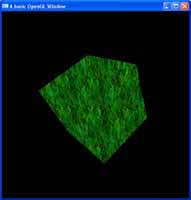
Texture coordinate generation is used when you are looking for particular effects in which it would take too long to work out the required texture coordinates all the time.

Examples of places you would use texture generation are: environment mapping and reflection mapping.

The very first thing that you need to do, is of course, enable the use of which texture
generation method you would like. There are four different types of textures you can generate, and they are:
GL_TEXTURE_GEN_S
GL_TEXTURE_GEN_R
GL_TEXTURE_GEN_T
GL_TEXTURE_GEN_Q

Also keep in mind that you can use
glTexGeni(GL_S, GL_TEXTURE_GEN_MODE, GL_SPHERE_MAP);
with paramaters such as:
GL_EYE_LINEAR
GL_OBJECT_LINEAR

GL_SPHERE_MAP
GL_REFLECTION_MAP

Each one of these is used for a different method. But I will not mention them at this point in time, I may in the future if I want to explain more in this tutorial. But every method that is used here, can be done in a GLSL shader program.

Anyway, thats it for using texture coordinate generation, if you have any questions please email me at swiftless@gmail.com

Texture coordinate generation is used when you are looking for particular effects in which it would take too long to work out the required texture coordinates all the time.

Examples of places you would use texture generation are: environment mapping and reflection mapping.

The very first thing that you need to do, is of course, enable the use of which texture
generation method you would like. There are four different types of textures you can generate, and they are:
GL_TEXTURE_GEN_S
GL_TEXTURE_GEN_R
GL_TEXTURE_GEN_T
GL_TEXTURE_GEN_Q

Also keep in mind that you can use
glTexGeni(GL_S, GL_TEXTURE_GEN_MODE, GL_SPHERE_MAP);
with paramaters such as:
GL_EYE_LINEAR
GL_OBJECT_LINEAR

GL_SPHERE_MAP
GL_REFLECTION_MAP

Each one of these is used for a different method. But I will not mention them at this point in time, I may in the future if I want to explain more in this tutorial. But every method that is used here, can be done in a GLSL shader program.

Anyway, thats it for using texture coordinate generation, if you have any questions please email me at swiftless@gmail.com

1.
2.
3.
4.
5.
6.
7.
8.
9.
10.
11.
12.
13.
14.
15.
16.
17.
18.
19.
20.
21.
22.
23.
24.
25.
26.
27.
28.
29.
30.
31.
32.
33.
34.
35.
36.
37.
38.
39.
40.
41.
42.
43.
44.
45.
46.
47.
48.
49.
50.
51.
52.
53.
54.
55.
56.
57.
58.
59.
60.
61.
62.
63.
64.
65.
66.
67.
68.
69.
70.
71.
72.
73.
74.
75.
76.
77.
78.
79.
80.
81.
82.
83.
84.
85.
86.
87.
88.
89.
90.
91.
92.
93.
94.
95.
96.
97.
98.
99.
100.
101.
102.
103.
104.
105.
106.
107.
108.
109.
110.
111.
112.
113.
114.
115.
#include <GL/gl.h>
#include <GL/glut.h>
#include <windows.h>
#include <stdio.h>

GLuint texture; //the array for our texture

GLfloat angle = 0.0;

GLuint LoadTexture( const char * filename, int width, int
height )
{
GLuint texture;
unsigned char * data;
FILE * file;

//The following code will read in our RAW file
file = fopen( filename, “rb” );
if ( file == NULL ) return 0;
data = (unsigned char *)malloc( width * height *);
fread( data, width * height * 3, 1, file );
fclose( file );

glGenTextures( 1, &texture ); //generate the texture
with the loaded data

glBindTexture( GL_TEXTURE_2D, texture ); //bind the
texture to it’s array

glTexEnvf( GL_TEXTURE_ENV, GL_TEXTURE_ENV_MODE,
GL_MODULATE ); //set texture environment parameters

//here we are setting what textures to use and when. The
MIN filter is which quality to show

//when the texture is near the view, and the MAG filter is
which quality to show when the texture

//is far from the view.

//The qualities are (in order from worst to best)
//GL_NEAREST
//GL_LINEAR
//GL_LINEAR_MIPMAP_NEAREST
//GL_LINEAR_MIPMAP_LINEAR

//And if you go and use extensions, you can use Anisotropic
filtering textures which are of an

//even better quality, but this will do for now.
glTexParameterf( GL_TEXTURE_2D, GL_TEXTURE_MIN_FILTER,
GL_LINEAR_MIPMAP_LINEAR );
glTexParameterf( GL_TEXTURE_2D, GL_TEXTURE_MAG_FILTER,
GL_LINEAR_MIPMAP_LINEAR );

//Here we are setting the parameter to repeat the texture
instead of clamping the texture

//to the edge of our shape.
glTexParameterf( GL_TEXTURE_2D, GL_TEXTURE_WRAP_S,
GL_REPEAT );
glTexParameterf( GL_TEXTURE_2D, GL_TEXTURE_WRAP_T,
GL_REPEAT );

//Generate the texture with mipmaps
gluBuild2DMipmaps( GL_TEXTURE_2D, 3, width, height,
GL_RGB, GL_UNSIGNED_BYTE, data );
free( data ); //free the texture
return texture; //return whether it was successfull
}

void FreeTexture( GLuint texture )
{
glDeleteTextures( 1, &texture );
}

void cube (void) {
glBindTexture( GL_TEXTURE_2D, texture ); //bind the
texture

glRotatef( angle, 1.0f, 1.0f, 1.0f );
glutSolidCube(2);
}

void display (void) {
glClearColor (0.0,0.0,0.0,1.0);
glClear (GL_COLOR_BUFFER_BIT);
glLoadIdentity();
gluLookAt (0.0, 0.0, 5.0, 0.0, 0.0, 0.0, 0.0, 1.0, 0.0);
texture = LoadTexture( “texture.raw”, 256, 256 ); //load
the texture

glEnable( GL_TEXTURE_2D ); //enable 2D texturing
glEnable(GL_TEXTURE_GEN_S); //enable texture coordinate
generation

glEnable(GL_TEXTURE_GEN_T);
cube();
FreeTexture( texture );
glutSwapBuffers();
angle ++;
}

void reshape (int w, int h) {
glViewport (0, 0, (GLsizei)w, (GLsizei)h);
glMatrixMode (GL_PROJECTION);
glLoadIdentity ();
gluPerspective (60, (GLfloat)w / (GLfloat)h, 1.0, 100.0
);
glMatrixMode (GL_MODELVIEW);
}

int main (int argc, char **argv) {
glutInit (&argc, argv);
glutInitDisplayMode (GLUT_DOUBLE);
glutInitWindowSize (500, 500);
glutInitWindowPosition (100, 100);
glutCreateWindow (“A basic OpenGL Window);
glutDisplayFunc (display);
glutIdleFunc (display);
glutReshapeFunc (reshape);
glutMainLoop ();
return 0;
}

VN:F [1.9.3_1094]
Please rate so I know where to improve the site. 1 means needs a lot of improvement, 10 means perfect. If you leave a low rating, please state why. I don't want people just coming to bash the site.
Rating: 6.6/10 (5 votes cast)
VN:F [1.9.3_1094]
Rating: +1 (from 1 vote)
Improve the web with Nofollow Reciprocity.